 If you want the absolute best sound quality from your digital music files, they need to be bit-perfect rips from CDs stored in a lossless compression format. I recommend using dBpoweramp Music Converter (dBmc) to do this. This page describes how to configure dBmc (version 12 or 13) for the most accurate bit-for-bit perfect backup of an Audio CD (compact disc).
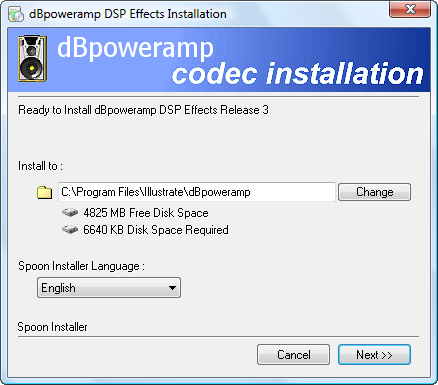
First, you will need to install the following dBpoweramp files:
- Install dBpoweramp CD Ripper and Music Converter. You will need to use either The PowerPack Version ($24; 3-week free trial) or the Reference version ($36; 3-week free trail.) I use the PowerPack version.
- Install the dBpoweramp FLAC codec (free)
- Install the ReplayGain lossless volume normalization plugin (free)
Note: It is possible to achieve the same results using the free software Exact Audio Copy (see this post for configuration details), but I find that dBpoweramp is easier to configure, is easier to use, has a fantastic file format conversion utility, and it has access to 4 total metadata providers for accurate tag creation. If saving $24 is more important than ease-of-use and time spent retagging files, EAC may be for you. Otherwise, dBmc is the way to go.
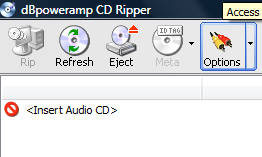
Once you have the programs installed, follow these configuration instructions:

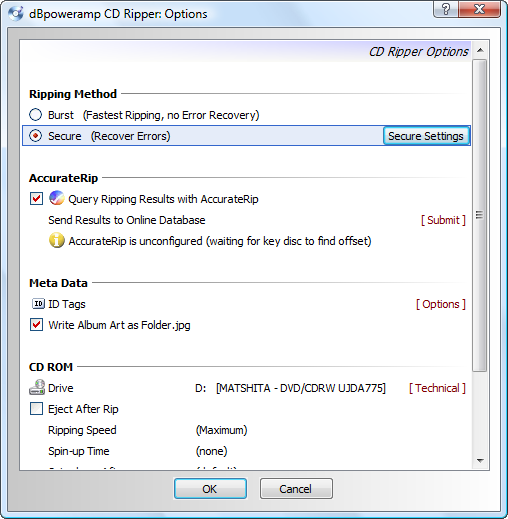
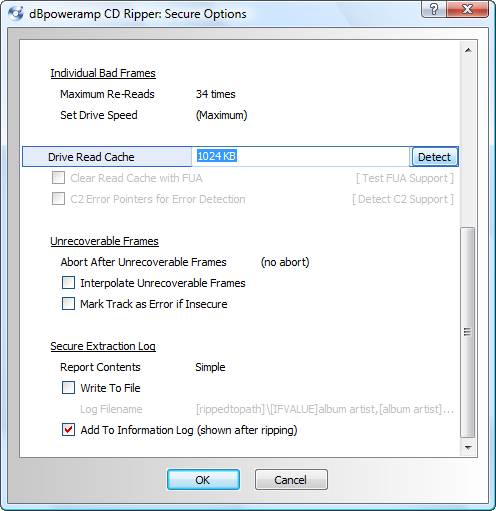
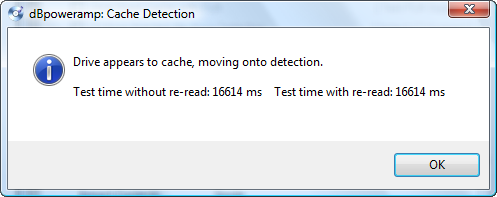

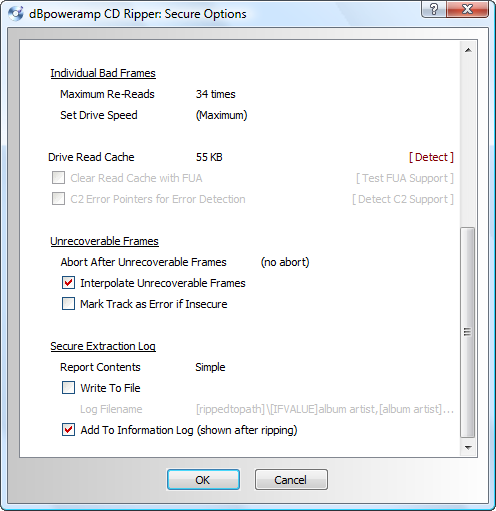
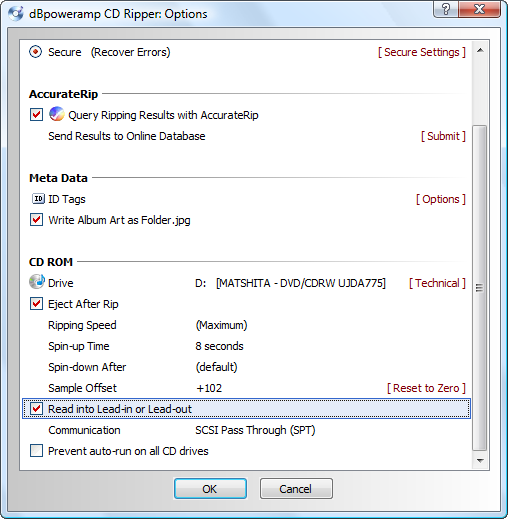
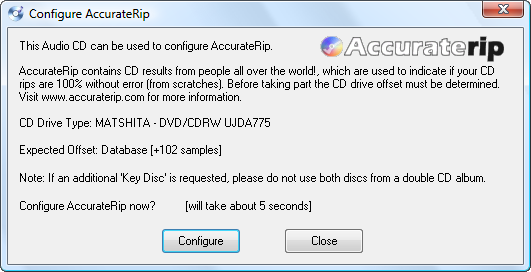
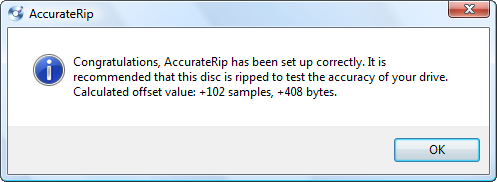
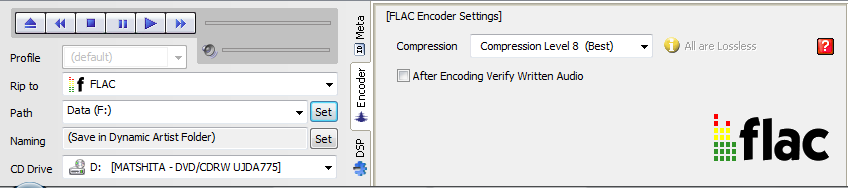
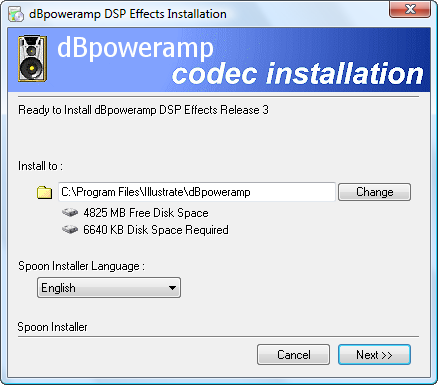
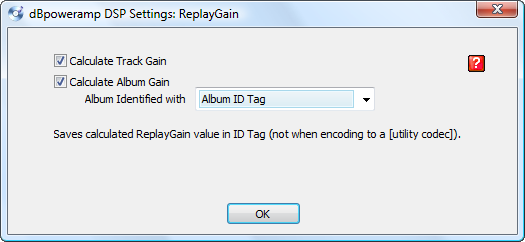
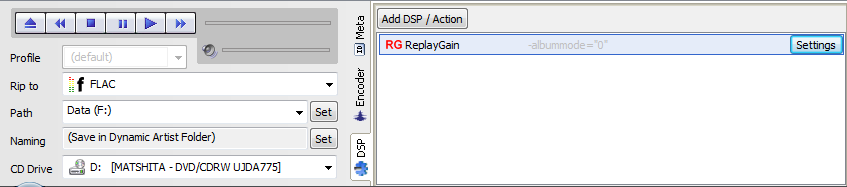



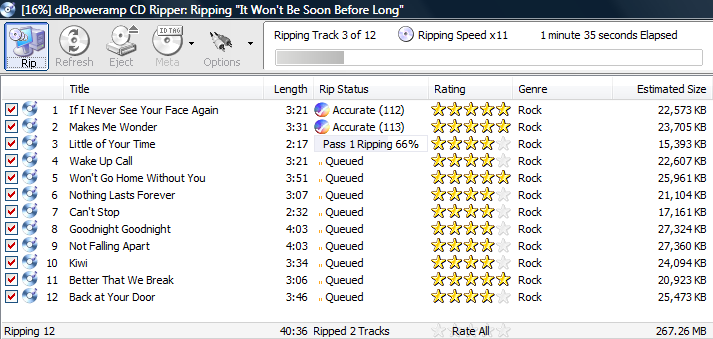
A Note on AccurateRip Confidence: After ripping a CD, you will see and AccurateRip confidence number. This number represents the number of people that extracted the exact rip as you just did. So the higher the number, the better, but a low number isn’t necessarily bad. Here are some examples:
- If all tracks on a CD give a confidence of 12, except 1 which has a confidence of 0, then there is probably a problem with that zero confidence track.
- If all tracks are 0, either the disc is heavily damaged or the CD isn’t in the AccurateRip database.
Carlton,
Thanks for posting the dBpoweramp config setting How-to. One additional question regarding Flac compression. The default is dBpoweramp Setting is level 5. You suggested using the Setting level 8 although taking a longer time to encode. Can you tell if there is any more over head to decode the compressed file on playback given you must not first read the file from disk but secondly decode it?
Also, What should I be looking for relative to confidence in the Rip? The AccurateRip confidence range for the tracks I rip range from 5 to 9 for a single pass.
Thanks again.
Bob, there is no difference on the decode overhead for higher compression levels. The requirements for FLAC decode hardware are very minimal; encoding is the only CPU-intensive step.
For Accurate Rip confidence, anything great that 1 is good and the higher the better. The application doesn’t do a good job of explaining what that number means; it’s the number of other people that extracted the exact rip as you did. So if all tracks on a CD give a confidence of 10, except 1 which has a confidence of 0, then there is probably a problem with that zero confidence track. If all tracks are 0, either the disc is heavily damaged or the CD isn’t in the AccurateRip database.
I have a CD that has one track with a 2 and the rest are 200…brand new cd. Is this defective?
It’s probably not a defective CD, but rather a new pressing. The fact that 2 other people got the same result means that it’s not defective, just different. You really only have to worry when 1) there are zero matchs and 2) it sounds funny (pop, digital glitch, etc.)
Hi Carlton. Is it best to rip to external drive or internal and then move it to external? What do you prefer?
You should achieve the exact same result either way. As long as the data extracted from the optical drive without error, it can be written to any destination and the result will the the exact same file.
The reason not to use an external drive is if it is extremely slow (USB 1.0) and the data is extracted from the disc faster than it can be written to the drive. It would have to ancient hardware to have this limitation.
Hello Carlton,
i can recommend another great cd-ripping software, which is free:
“exact audio copy” (www.exactaudiocopy.de)
regards
Udo
Hi Carlton
I would like to thank you first for all your help and patience in the past with getting me up and running with dbpoweramp. I now have all my CD’s ripped to Flac and am very pleased wih sound quality.
I would like to ask your expert advice today on another matter.I recently purchased a Ford truck with Ford sync and a USB input.I would like to burn music to a USB thunbdrive to use in vehicle unfortunatly the truck does not support Flac files only MP3,Wav,ACC and WMA.I would greatly appreciate your input on which one of these formats will give me the highest quality sound.I have a 16gb thumbdrive but will purchase a larger one if fie size is an issue. Sound quality is most important.
I will be making copies of my Flac files to convert to whatever would be best format and using dbpoweramp to do this.
Thanks again for your help
Keith
Hi Carlton
I would first like to thank you for all your help and patience in the past with helping me getting my CD’s ripped to Flac thru dBpoweramp. I now have all of my music on Flac files and am extremely happy with the sound quality I am able to have through out my house using my Sonos system as well as other equipment. Thanks again
I am reaching out to you today to ask you for some help with a question I have about music file formats.I recently purchased a Ford truck that has Ford sync as well as a USB input. I would like to download albums onto a USB thumdrive and be able to listen in my truck.Unfortunately the system does not support Flac files only MP3,Wav,ACC and WMA. I would appreciate any advice you could give me regarding which of these formats would offer me the best sound quality.
I have a 16gb thumdrive but will purchase a larger one if file size is an issue. Sound quality is the most important.
I will be making copies of my Flac files and converting them to whatever you suggest using dBpoweramp.
Any advice would be greatly appreciated.
Thank you again
Keith Johnston
P.S. I apologize if you are recieving this twice I posted earlier and it went missing when I returned to site
Keith, glad you found the info useful. At lower bitrates (128 kbps or less), there can be some significant differences between the compressed formats. However, if you encode them at higher bit rates (256 kbps or higher), you won’t be able to tell the differences between any of the formats; they all sound great.
You listed WAV as one of the options; this is also a lossless format. The problem with WAV is that 1) the files are big and 2) there is no universal tagging format, but it may work for you. There is also WMA Lossless format that may play back on your Sync system. Since SYNC is a Microsoft system, WMA and WMA Lossless are a Microsoft file formats, there is a chance they will work.
If you “just want it to work” without messing with it too much, I’d recommend MP3 encoded at 320 kbps. This should play on about any system out there and will offer very good sound quality.
Hope this helps!
Hi Carleton-
Great site- keep up the good work(!)
IME if Keith has a decent, multi-speaker sound system in his truck, there will be some payoff of going with WMA lossless instead of 320kbps. Even with modest road noise the increased dynamic range will be obvious vs MP3. This is even more noticeable when you compare a CD vs MP3 on a decent car system. But if his system is a basic stock head unit and two speakers, it won’t nearly bring the same impact.
Hi Carlton
Thanks for getting back to me so quick and thanks for advice.I cannot begin to tell you what a wondertful website this is and how great it is that you put your time out there just to inform and help people. Very rare these days Thanks
Just a few follow up questions 1. If I decide to go with the MP3 format using dBpoweramp to convert to 320kps the target in the encoder settings would be free format so I can get to 320kps as opposed to VBR or ABR or CBR? and under advanced would you force stereo as opposed to auto since I would be using higher bit rate or is there no need?
2.It appears that Sync does support WMA lossless so would that be the better choice? It appears that dBpoweramp will let me add this file codec as add on and allow me to convert to WMA lossless Finally any settings in WMA Lossless that you recommend.
Sorry for all the questions and questions and questions and thank you again for the knowledge and help.Will keep it to a minimum from here on.
Keith
Keith, CBR (constant bit rate) would be the most compatible and you could specify the bitrate (320kbps). ABR and VBR allow the bitrate to float based on the content of the music, so they are configured based on target file size or a 0-100% sound quality rating. For high bitrates / size / quality settings, you shouldn’t be able to tell the difference between the settings. Auto or forced stereo should result in the same 2 channel file; it’s really for detecting mono files (usually spoken voice.)
WMA Lossless would give the best quality (identical to FLAC), but not sure you could hear the difference and it would take more drive space. It will be a trade-off between quality and # of songs on a flash drive. There aren’t many settings to mess with for WMA Lossless, so just us the default.
Enjoy!
Carlton
Thanks again for your help. It’s great to have you out there to clear up the confusion. This is a great site and your a great person to give of your time.
Thanks again for the help past,present and probably future 🙂
Keith
Hey Keith. I am weighing in on this thread waaaaay late. I have an 2012 F-150 with Sync with voice and nav installed. Sound system is an OEM designed by Sony. I recently discovered a 2nd USB (USB – Mini A) in the back of my unit by reading forum posts and taking off the tray to the center speaker to reveal behind the dash. So I went and bought a USB 3.0 Toshiba External Hard Drive with an adaptor and installed it. The hard drive is the size of a pack of Canadian Cigarettes.
I transcode from FLAC to WMA Lossless and listen to that codec exclusively. It provides a fuller richer sounder especially in the low to mids. With the expanded capacity of the hard drive over the thumb drive, I have more than enough room to hold all my music.
Good to hear you were able to expand your listening options!
cheers
This Page used to have way more info that no longer shows up. What I really need is the naming string that used to be on this Page. I had to reinstall windows and i need that naming string before ripping anymore cds.
Please help.
Thanks Ryan. I had to export, purge, and repopulate the server database and it looks like the gallery photos and text didn’t survive the process. Give me some time to search the old database and find the missing data.
I found the naming code off an uber old windows image. I like it so much cause it dates the albums. The following is the code:
[IFCOMP][IFVALUE]album artist,[album artist],Various Artists[]\[year] – [album]\[IFMULTI] Disc [disc] – [][track] – [artist] – [title][][IF!COMP][IFVALUE]album artist,[album artist],[artist][]\[year] – [album]\[IFMULTI] Disc [disc] – [][track] – [title][]
Thanks Carlton for your excellent tutorial/guides. for a modest ripping project (circa 500 CD’s); what would be a safe/best bet in terms of an external CD-ROM to use for ripping the collection; would appreciate any advise or input on options for CD-ROM hardware. thanks ===
Mo, it used to be that Plextor drives were the reference standard. But to be honest, that was a long time ago and I haven’t noticed issues with any of the drives I’ve used in the past 5+ years. Blu-ray readers are pretty cheap now and I haven’t had issues used them either.
Thanks Carlton;
Your feedback is much appreciated
I have a 2 CD set that has the first 4 tracks of the Beethoven ‘Missa Solemnis’ on disc 1; The fifth track is at the beginning of disc 2, followed by the 5 tracks of Mozart’s ‘Mass’. How do I get the fifth track of the Beethoven into the folder containing the Beethoven where it belongs? I can get the Mozart in a folder by itself by just selecting out the Beethoven track.
You could figure out how to do this automatically by creating directories based on track artist, but it’s probably easier to just edit the track metadata to reflect the info you want and move the tracks into the folder structure you want. Depends on how often you encounter the problem and if the online service tags the tracks consistently…
Hi Carlton, just a little thanks out of Switzerland. Simple. Clear. Perfect. Patrick
I’m glad you found it useful!
Hi Carlton,
I’m contemplating my third attempt at ripping my CD collection. I’m getting old and have way too many discs, so I want this third time to be the proverbial charm.
The information for dBpoweramp claims to use multiple cores on processors that have them. Having seen fairly startling increases in throughput from other (non-audio) applications that have added support for multi-cores, I’m curious as to how long it takes dBpoweramp to rip CDs to FLAC.Have you timed the process? If so, is it possible to estimate ripping time from the total time of a disc? And can you compare the time to other ripping applications?
– Mark
Mark, there are 2 phases to ripping a CD: reading it from the optical drive, and then compressing the audio to a file. Modern CPUs are so fast that they can easily compress to FLAC (or any other format) much faster than the optical drive can read it. So the pacing item will be the optical drive speed. And if there are scratches or errors on the disc, it will slow the read speed substantially, and that will be the pacing item.
If everything goes perfectly, you can read a disc i less than 6 to 10 minutes. To speed up the process, add optical drives. The desktop Plextor drives have been good for me in the past, but most of the brands are probably just as good.
Hi Carlton,
Thanks for the information on your site just happened to run into it. My settings were pretty much like yours, which is good. I have read some articles that mention burning your CD’s in real time (x1) to help with errors and providing a better chance at bit perfect rips. I wanted to ask your opinion if you think ripping at faster speeds could add the possibility for errors to occur from the cd/dvd/br rom drives perspective? Also, does anyone know of a cd/dvd/br rom drive that supports burning at x1 speed? The lowest I’ve seen so far is x4. Thanks for your time! Dave Kos
David, burning at a faster speed can definitely result in read errors on some players. At up to about 4x, the burned pits are accurate. Faster than that, and the burned pit structure starts to deviate from the standard. It’s generally close enough that it doesn’t cause an issue, but not always. Burn speed is determined by the burner software more than the drive itself. To burn at slower speeds, just change the software setting.
For ripping from a disc, as long as you have error correction enabled and/or use accurate rip, read speed isn’t much of an issue. The software will read and re-read as necessary when errors are detected. I just leave it at maximum speed and let the software adjust as necessary.
Hope this helps!
Carlton,
Very informative site! Thank you very much for posting this great informative site. My question is… If my intent is to be able to convert FLAC to either MP3 or M4A, should I rip with FLAC with uncompressed, Level 8, etc… or should I rip to WAV uncompressed?
Using the level 8 settings saves the most space, and isn’t much of a headache since you probably won’t be encoding more than once. YMMV. FWIW, the encoding process takes longer on 8.
Hi Carlton,
A pleasure to meet you.
Forgive me upfront if I missed it earlier because I am banging my head because I am an audiophile and quality is the utmost important item over size with me personally.
That said, I am trying to rip a CD from my internal optical drive and I am using DBPA reference 14. I would like to accurately rip a CD to FLAC in it’s highest quality.
Do I just add the FLAC add-in and configure FLAC setting to the number 0 and that’s it and rip away? Or am I missing some other elements to add/configure to get the highest sound quality? Thanks in advance Carlton !!
I really appreciate it.
Yes, it’s pretty much that simple. Except there is no sound quality difference between FLAC 0 and 8. Lossless is lossless. It’s just with 8, it works the CPU much harder trying to optimize and minimize the file size as much as possible.
That last sentence has me wondering if FLAC 8 causes the CPU to work as much harder to decode the file as it does to encode it.
P.S. I’m finally going to get going on the Great CD Re-rip Project I alluded to 26 months ago (!). I have the time now that I’m retired.
The CPU decode load is constant regardless of the encode compression setting. The CPU cycles are spent trying to encode to the smallest possible file size that meets the FLAC format, but the decode is the same regardless.
That’s good to know. Thanks!
Thanks for your article. Do you reckon that you can get bit perfect via a pc, rather than using using dedicated audiophile cd ripper eg naim cd ripper. Obviously expensive
A PC can undoubtedly do this with no issues.
Thank you coach Carlton, I just bought it the app for my macbook, yet I just wanted to really appreciate how rich of details your article.
I have to admit, I didn’t even realize that a Mac version was available! I’ve been using X Lossless Decoder (XLD), and it’s adequate, but will definitely switch to dBpoweramp now that it’s available.
One thing I’ve noticed here is you haven’t mentioned anything about the Ultra Secure Ripping option under the Secure Ripping menu. Do you have it enabled? To what setting? And if not, why not?
Thanks
You can use Ultra Secure Ripping if you are having issues with 0 matching results returned from AccurateRip. Otherwise, it’s not necessary. I remember it being a little slower, but that may have changed.
Although not lossless do you have a “how to” tutorial for installing MP3 Encoder Lame 3.99.5? I do not see how you install with a Tarball extension and have never seen an exe for it. Maybe you can help.
Sorry, I’m not sure about the LAME settings or configuration.
Will you consider doing a configuration tutorial for the Mac version? Or is it too similar to the Windows version?
Thanks
Allan, I haven’t used the Mac version yet. I don’t purchase that many CD anymore and I’m not sure I’ll have a chance to create a Mac version tutorial. Hopefully the setting are similar enough that they will work.
I have a problem with a disc that had a few milliseconds of the beginning of one track appended to the silence at the end of the previous track, with that data missing from the track it belongs to. The rips for both were secure with the same AccurateRip scores as the other tracks on the disc, so it looks like the CD track info was configured incorrectly.
I thought to use Rip as 1 to fix the problem, but that seems too fussy. It was easier (read: “faster”) for me to load the files into Sound Forge and do a copy-and-paste between the two. I discern no difference in the sound of the previously split song, so I’m happy.
Is there something else I might have done in dBpoweramp to fix the problem?
What you did is really the best option. You have to edit the files if the disc is incorrectly authored. dBpoweramp isn’t designed to fix issues like this.
Hi Carlton, thanks so much for this useful tutorial. I was wondering if you could kindly tell us something more about the naming convention that you are using, as I am considering doing the same, and it’s going to affect the whole collection. I’ve seen other tutorials recommending a simple approach such as:
[artist]/[album] – [title]
One question that I have, in particular, is weather it is a real advantage to have the track number at the beginning. Is it going to work well with most music collection software, such as Fidelia or Audirvania? Did you ever experience issues with track order or so? And are double albums recognised automatically?
Generally speaking, I do like the approach and also believe despite not being very practical to have so many nested folders in your file system, the problem is solved once the music is imported into the music software. I mean, you are not supposed to open files from the file system…
Also a quick question, do you recommend clicking on the “meta” button before ripping? The dbpoweramp interface is ambiguous, it looks like the data is retrieved automatically when the CD is inserted, but then I would expect that button to be disabled…
Many thanks
Thanks a lot, man. Great tutorial. Although by the time I read it, the version number and look and feel of the prgram has changed slightly, the core elements and settings are the same.
I’ve used EAC for ripping CD’s for as long as I can remember. Now I think I was kidding myself all that time. DBpoweramp and Perfect Tunes, I use in combination now… just one word. Perfection ! Worth every penny! Extraordinary comfort and quality.
I have about 350 AIFF files I want to convert to FLAC in order to minimize file sizes. foobar2000 has no support for transferring AIFF metadata, so I’ll be using Music Converter. I tested it on a couple of files and didn’t seem to have any problems, but I wonder if I might need to tweak the configuration. Have you used Music Converter and, if so, do you have any advice?
I use and highly recommend dBpoweramp Music Converter. That’s not really anything you need to do to the settings; it will work without issue. I set compression level to 7 to reduce file size as much as possible, but there isn’t much difference in file size. If you want to maintain folder structure, set it to save the converted file in the same folder as the original, then delete the original.
How could this be a bit by bit accurate rip with replay gain active. I thought that changed the “gain” of the rip. (+ or – dB)
The ReplayGain offset is stored in the metadata, and does not change the extracted bitstream. The ReplyGain metadata basically tells the playback device to offset the reference playback volume by a specific amount. In other words, it slightly adjusts the volume setting of your player without you having to do it manually. But it’s the same as manually adjusting volume up or down, with no impact on the source.
I just came across this site, and I have a question for you. I tag my files/folders individually because I can’t get the program to name the way I like. So to give you an example, Aerosmith/[1980] Greatest Hits/01 Title.flac (ex1), Henley, Don/[1989] The End of the Innocence/01 Title.flac (ex2), Steve Miller Band, The/[1976] Fly Like an Eagle/01 Title.flac (ex3), Various Artists/[1992] MTV Party to Go, Vol. 2/01 Title.flac (ex4), Soundtracks/[1977] Saturday Night Fever/01 Title.flac (ex5). How would I set the Naming string based on this?
Your example… [IFCOMP][IFVALUE]album artist,[album artist],Various Artists[]\[year] – [album]\[IFMULTI] Disc [disc] – [][track] – [artist] – [title][][IF!COMP][IFVALUE]album artist,[album artist],[artist][]\[year] – [album]\[IFMULTI] Disc [disc] – [][track] – [title][]
I’m using dbPoweramp Reference 16.
Thank you for this awesome guide.
I have ripped CD’s using J River and I didn’t have to do a thing, but pick the type of Lossless file I wanted. After that, I just popped CD after CD into my Plextor’s (I held on to a Corsair full case, just for that purpose, to have CD players set up with direct SATA connections vs. external CD burners in a USB container. I am scratching the beard I’ve never wanted, and wondering why in the world, isn’t there an opportunity to do the same thing with dbPoweramp? Who is ripping CD’s that doesn’t want the very best? The fact that this software exists and there is a forum to get help from, tells me that there should be giant steps forward in this kind of software just as there has been a mighty large footprint made by the progression in the hardware. I busted laughing out loud when the one young man! above mentioned saving onto a 16GB USB drive. Good grief, I am putting my first rip of 800 CDs onto a stick of gum-sized Nvme M.2 SSD; a Samsung 9001 PRO 4 TB drive that almost literally “flies” at speeds you folks 16 years ago, would not have believed me had I time-traveled with this “hard drive” back to you, 16 years into the past. Someone mentioned cores and how many would you like to have on this project? 24, OK? Incredible that we are now in an age, where only the “old school” that wants to take credit for his/her overclocked score, while the rest of us are hitting XMP 2 and calling in Ai to handle the rest of the work. I don’t even need to unzip my BIOS update as the ASUS Utility would prefer that you bring it all along; both BIOS and Firmware bundled, and to leave my hands off that “used to be a fun job!”
I am hoping that I can ask just a few questions and be ready to go. I want the absolute best laydown of CD tracks and the most organized system of storage; that I can play the whole album straight through, or I can call forth a playlist that only has two of the 16 tracks that I really want to hear in my hear that is feeling like it is sitting on the grass at Pine Knob Michigan’s ski resort that has summer concerts outdoors, but I have to have a photo in front of me for every instrumentalist and vocalist will be standing as I see and my hears can hear; that they are right there on the “sound stage” just as they appear in the photo. For I am listening to Sennheiser HD 800 S headphones with an XLR connection from the original Sennheiser cable “pulled” and sold to me on eBay. It is amazing, really. Moore’s law has held on this long, but we are entering an age where I am, and I am sure others are also, “How did we mess it up so badly, that we made the jump from PURE Analog to Digital, for what reason? Audiophiles exist because we stopped the progression of where Analog might have taken us had not “Big Digital” (Remind you of Big Pharma?), financially wrestle away, without much resistance, and boy, have we paid. I look at this thread 16 years old and that pattern has multiplied 100-fold as there has been every gimmick (MQA) to do what “fake” Quad did back in the USA in 1973, where we stacked 4 speakers in the corners of the room and insisted that they created some original and definitely not close to some kind of creative sound. Only the wealthy ever enjoyed that first leap from stereo, to which almost all audiophiles have retreated back to. The movie makers do record in 5.1 and do have special Microphones right on the movie stars mouths, but our ARC devices are not grabbing the pure 5th track but it is a synthesis accomplished by Ai. I am drifting off the tracks because it is so easy to do.
I just want to know how to rip all of my CDs to the very best sounding recording onto my NVME, which I will copy to 4 more in USB adapters with a stick of gum inside holding 4,000 GBs of music to give to each one of my daughters whom we raised in Taiwan years before this thread was started. My CD’s turned out to be daughter’s oldies too! For Taiwan had zippo for a radio station that was playing the “Back Home in the USA” music.
I hope someone replies to this, having been entertained, provoked to ask why didn’t we see where the Analog music might have gone (and taken us with it), instead of spending thousands of dollars to get this digital convenience out of the way, for the bottom line is: God gave us ears with 3 little bones that vibrate and create chemical changes which are captured by “electricity” and transported as Action Potentials to the brain through our Auditory Nerve. Now someone try and explain how that “Analog” motion outside our brains is “played” for us again on a soundstage that is our minds! No one can explain that miraculous sound that can be ramped up inside my mind and yet no one can put their ear on my head and hear a darn thing!
Amazing and I hope that this process will be amazingly able to take me through a ripping process that would have taken a whole lot of set of instructions.
Like Web designers today, they don’t have to be able to write code, they just need to know what pieces of code go where and the puzzle out of the process is gone.
Sorry, I get stuck on a thought and drift away. My questions are: #1 has this process of burning a CD collection to a much-improved sounding Lossless files (FLAC for me), organized on an amazing Nvme drive, gotten down to the “just do it” stage? I have only used J River and it was fast and seamless, but I am realizing that there are new heights that I haven’t seen; but I don’t want to have to be on a steep learning curve. I have done that for thousands of Dell customers once before and it was fun once but I don’t want to have to know how I got to my final project’s end. I just want to open the case, but the CD in and hit play. With a few obvious settings, but not at the detail I am reading here.
#2 I have always assumed that FLAC was as good as any and better than most (not necessarily all), and I would not be able to hear the difference when playing back from an Nvme M.2 drive that is set through a USB cable into a DOUK, with the output being an i2S, which is inputted to my Topping D90 iii Pro ESS, and to its Headphone Amp, which is also a preamp with two gain settings. All is balanced with some great Audioquest Carbon XLR cables and amplified with an SMSL PA-X Amp which receives an XLR balanced L and R and sends the signal off two ELAC UniFi Reference speakers.
Having the great improvement over the original CD is a gift, and so Thank You to dbP!
#3 do I need to purchase Perfect Tunes as I am starting from scratch? and if I am going to place “USB adapters with an Nvme inside”, do I need to invest Tunes Fusion? They don’t make it possible to bundle with a “Music” only bundle, like Ripper/Converter + Perfect Tunes + Tunes FUSION, having that bundled for a price. Am I wrong that most Audiophiles are not purchasing the Photo and Video software, which drives the sound package up to $146?
#4 After I am done ripping, should I have asked the question before beginning this kind of project (To place a CD collection onto a convenient Nvme M.2 SSD) I place the CDs in any kind of order, or does that not matter.
#5 When I have finished ripping and I can give to each one of our four daughters a copy of the music that they grew up on, what do most folks do next. How to I make place lists? Do I want to get rid of all duplicates or do they still serve a purpose, like having a whole album in tact?
#6 Do I buy Fusion or is it not needed?
#7 Do most place these songs onto a server? Any recommendations? I have two PC’s. One is built on an ASUS ProArt Z890 Creative workstation motherboard, with an Intel Ultra Series 2 i9 and the second is built on an Asus Z890 Stryx-E with multiple M.2 5.0, which is great for storage and any recommendations to have virtual running in place of a server?
I would appreciate any help as I do not even know what I should or shouldn’t buy, let alone how to get started. Like I indicated, I have only used J River and I am not sure if that is more about music and library’s and not focused on the BEST BURNING.
Thank you to anyone who offers me some much needed guidance.
GB
You don’t need Tune Fusion. Just the ripper and perfect tunes.
How you organize the files is up to you and it depends on how you play them back. If the player browses by folder, then you need to carefully arrange them by folder. The setup instructions help automate a coherent folder structure.
If the player browses using metadata within each file, which is most common, then you need to make sure everything is tagged properly, which Perfect Tunes helps with.
You can store and share the files on any computer (Windows, Mac, Linux). I use a Synology NAS, but anything can share a folder on your home network.
I would like to add that I appreciated the guidelines for bit perfect ripping of CDs. 16 years ago this was probably a lifesaver to many. My question, fast forwarding 16 years; do we still need these steps, which for me are going “over my head”. It is like the new Web designer, who cannot write code, because, like the calculator in elementary school, so much has already been created that a Web designer today can pretty much find a template for any task. The great ones though are the ones who chose to learn their multiplication tables, addition, subtraction, and division as well and are able to be much more creative. I have chosen to be less creative and I am hoping that the ripping of my CDs to FLAC files will be, for the most part, brainless, and I will build on the shoulders of those of you that posted here 16 years ago.
Hi David. Unfortunately, very little has changed in the past 16 years. The software is pretty much the same as it was, and so is the hardware. The good news is that you can still follow this guide and get bit-perfect CD ripping results.The Audio CD was released in 1982, and it doesn’t really matter what else changed since then because it’s the anchoring technology.