 Let’s face it, the thermostat that is installed by default in most dwellings is pretty basic. If you have a digital display that’s the “upgraded” version; and all it does is replicate the functionality of the old rudimentary mercury switch / rotary knob designs. An advanced thermostat with scheduling features can save quite a bit on your energy bill, but can also be an interesting gadget to occupy your time. Since my energy company is offering a rebate for anyone who upgrades to a scheduling thermostat, I decided to pull the trigger. The features I identified as necessary for a new thermostat are:
- Scheduling of temperature based on time of day and day of week.
- Automatic switching between heating mode (temp not to fall below lower set point) and cooling mode (temp not to exceed upper set point)
- Capability to display a remote (outside) temperature
I’ve researched some of these thermostats recently and here’s a summary of the information I’ve found.
Level 1: Scheduling Thermostat
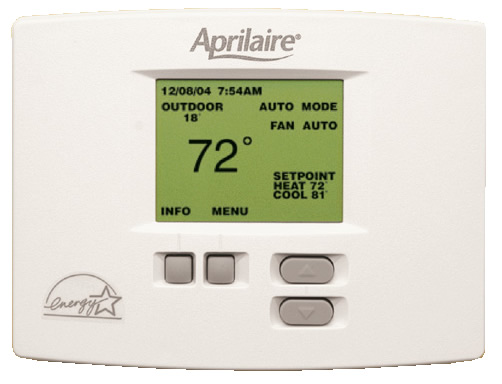
The Aprilaire 8570 (shown above) meets all of the basic requirements for which I was searching and has a large display that makes it easy to program. For basic scheduling, auto heat/cool mode switching, and outside temperature sensing, this is the best thermostat I’ve found. Price: about $120.
Level 2: For those looking for even more features:
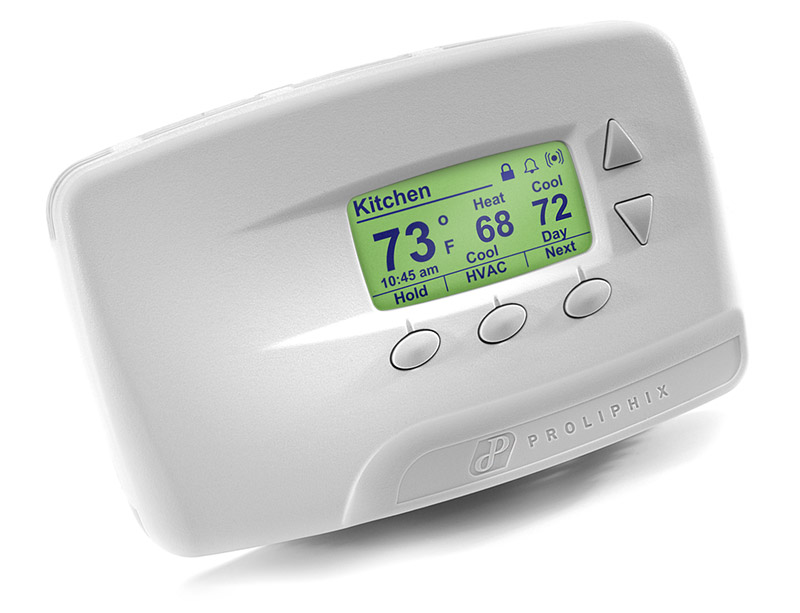 The Proliphix NT20e offers all of the features of the Aprilaire but includes Ethernet network integration, which opens up an entirely new set of capabilities. For example, you can connect to an embedded webserver on the thermostat and configure all of the settings and schedules from any computer on your local network. The thermostat can update its time over the web, so you never have to set the clock. It can also send e-mail / text page alerts if the temperature gets too high or too low. In addition, you can connect to the thermostat when you’re away from home through a free account on the Proliphix website. If you have an advanced home automation controller, it can send commands over the network to change thermostat settings. Price: about $260 (Note: the NT10e does not include remote temperature sensing, but does include everything else is a bit cheaper.)
Biggest Disappointments:
The RCS X10 was my initial first choice, but after preliminary research, I found that it has no scheduling feature! Sure, you can raise and lower the temperature from an X10 remote device, but it doesn’t have any built-in automatic scheduling. I you are one of those people with advanced home automation system, you can use that to automate the thermostat settings. For me, this is a complicated and potentially troublesome combination. I’d rather have the thermostat itself taking care of all of the scheduling, not a computer or external controller. I think the Proliphix is a much better option and it can also be controlled over the network (many home automation controllers are capable.) I’m glad I didn’t purchase the first thermostat I found. Price: about $200.
The Aprilaire 3020t Communicating Thermostat has most of the features of the Proliphix NT20e, but it requires a central control until. The thermostat cost about $200. . . but the controller unit is another $800. This is way to expensive for my needs, and offers many multi-zone control features I’d never use. But if you have a multi-zone system, this may be a pretty descent option.
While it has no built-in functionality for scheduling, that really is not a problem for home automation setups. Anyone using home automation products will already have some type of central controller. I use one from X10. For only $50, I can program it easily from my computer (it connects via USB). My computer doesn’t have to be on and the battery backup keeps the programming on the device protected from power outages. The software also allows me to make a backup file on the computer of my configuration. Now, I control my sprinkler system via X10 using a sprinkler control system that is dumb (no onboard scheduling software) and have infinite possibilities of control with my sprinkler system. I control the lights in my home. With the same $50 central controller and the software on my computer, I can control my home heating and cooling with infinite scheduling possibilities.
Richard Says:
May 25th, 2007 at 2:10 pm
While it has no built-in functionality for scheduling, that really is not a problem for home automation
Richard,
Could you share the model numbers of the X10 elements you mention here?
Thanks,
I use ActiveHome Pro software with the CM15A USB controller. It works very well for me. For sprinkler system control via my X10 controller, I use a Rain8 II (http://www.wgldesigns.com/rain8.html). I also use a V572 whole house transceiver from http://www.wgldesigns.com/ for better X10 wireless range. For heating/cooling, I have an RCS TX15 X10 controllable thermostat that I picked up used on eBay for about ~$60. I use various different X10 light switches, lamp modules, and motion sensors within my home to control the lighting. I have a few plug-in noise filters and use a BoosterLinc to amplify my X10 powerline signals and a phase coupler from SmartHome that plugs into my downstairs dryer 220v outlet to couple the phases of my electrical system.
I love the low-cost and flexibility that X-10 technology provides.
It’s worth having a look at http://www.heatmiser.co.uk/ for individual room programmable stats controlable via touch screen, sms etc.
We offer hosted services for the Proliphix Thermostat line:
* Data logging
* Graphing
* Mobile access/control
* Dashboard
* Alerts
and more…
inthrma.com
I’m using the Venstar T1800 and it seems to do everything the Proliphix does but via the Insteon network instead of direct via ethernet. That makes it easier to have incorporated into a script for local control or via weather feeds etc, but obviously you can do anything via HTTP post with the Proliphix as well, just a bit harder. 😉
Check out http://www.getemme.com/ for a WiFi enabled thermostat with weather forecasting and multiple remote sensors. It’s not for sale yet, but I have been waiting years for something like it. The technology exists, it’s just a matter of someone putting it all together.
I’m looking for a thermostat that has >4 settings available per day. Our MBR is on the second story, and has it’s own furnace. At night, we set the thermostat to 60 deg. When the furnace kicks on for the first time in the morning, it consistently overshoots the mark. I believe that the thermo calls for heat and the air in the room doesn’t circulate fast enough to get back to the thermostat to tell it to shut off. Thus, it keeps calling for heat even though most of the room feels like it is 68 deg.
What I’d like to do is program a thermostat to come on at 6:00am, and go to 64 deg. Then at 6:15 I’d have it jump the rest of the way to 68 degrees.
Doug, I haven’t looked at this in a while. My HAI Omnistat thermostat can do this, but it’s a bit expensive if not integrating it with a home automation system. Nest seems to be a pretty good option as well, but I have no experience with it.