How to Scroll if Your Mouse has No Scroll Wheel

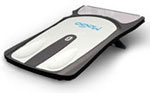
Mogo Bluetooth Wireless MouseEdit: MoScroll is a great, free, open source alternative: http://codescribes.blogspot.com/2007/02/moscroll.html

I’ve recently found myself using nothing but point devices with no scroll wheel: my Mogo Bluetooth Wireless Mouse, my 3M Renaissance Ergonomic Mouse, my Dell Latitude laptop. One thing is missing: the ability to scroll. That is, until now.

History: About 10 years ago, when Steve Jenkins was running Windows95.com shareware site (which become download.com), he would select the best software each year and give it a “WINner Award.” One of the software products that deservedly earned that designation was Pointix Scroll ++, a handy little app that sits in the Windows tray and allows you to scroll by holding and dragging the left (or center) mouse button. Back in those days, the first scroll wheel mouse was just released and Scroll ++ gave “old school mice” the ability to scroll without one. I downloaded it, gave it a try, and purchased it instantly. But soon the scroll wheel became common place in the cheapest mice, Pointix was acquired and disappeared into oblivion, and this piece of software history was all but forgotten.

Fast-forward to present day: There are new and innovative pointing devices that just don’t have room for a scroll wheel. Users are frustrated, everyone complains about it, and there is no apparent solution. Unless you remember Pointix Scroll ++. Unfortunately, I couldn’t even activate the version I purchased because the company is long gone. I tried to contact the original copyright holder, but had no luck (it’s just a generic spam-like advertising site now.). Since the US Copyright Office has given approval to share abandoned software, I’m posting for download Pointix Scroll ++ version 2.05 for Windows (including activation) for anyone else who may need it. Below are details on how to install it and activate it.

Download, Installation, and Configuration Instructions (after the break):

  • Download the zip file containing Pointix Scroll ++ 2.05 + activation (as well as PopMouse 3.15 + activation)
  • Extract the Zip file (using WinZip or an equivalent)
  • Run the file named Pointix Scroll++ 2.05.exe to install (you’ll need to enter your name and a company namebe sure to enter both!)
  • Run the file named Pointix Scroll++ 2.05 Activation.exe to activate (you’ll need to again enter your name and a company name)
  • If you have issues with activation, try Pin:  Netplaque000000000000 (12 zeros) and Password: 00000010 (6 zeros)
  • Pointix Scroll++ will load when Windows boots (make sure there is a shortcut to Scroll++ in your Start -> All Programs -> Startup folder)
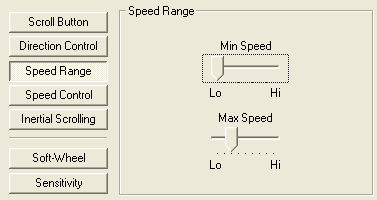
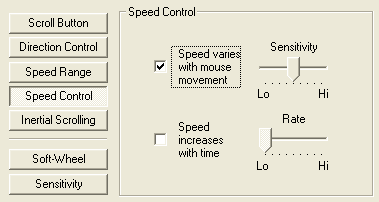
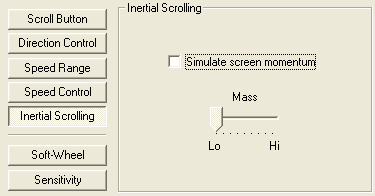
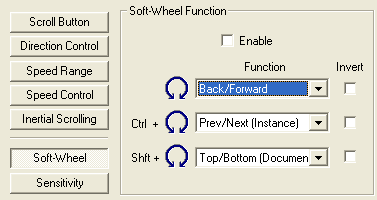
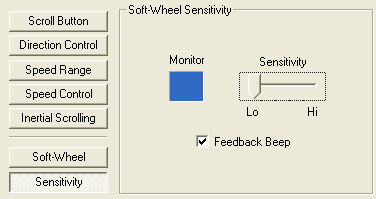
  • Click the Pointix Scroll++ icon in your system tray, select Preferences, and make the following settings
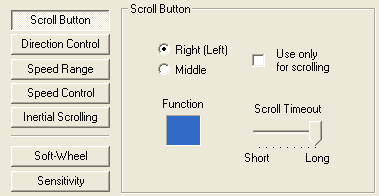
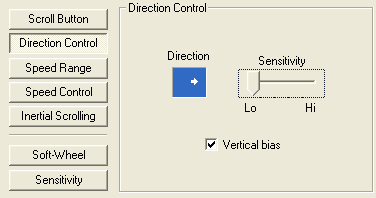
Pointix Scroll Configuration Details 1
Pointix Scroll Configuration Details 2
Pointix Scroll Configuration Details 3
Pointix Scroll Configuration Details 4
Pointix Scroll Configuration Details 5
Pointix Scroll Configuration Details 6
Pointix Scroll Configuration Details 7

77 Comments »

  • HK Seo says:

    You deserve a Santa’s respect! Thank you!

  • Tristan says:

    THANK YOU! I have a Kensington Orbit Trackball and I love it except that I’m unable to scroll. This fixed everything! Amazing.

  • antonio leao says:

    Hi,

    Someone knows how to use de left button to scroll, on this pointix scroll++ software?

  • Carlton Bale says:

    Antonio: I’m not sure how to configure it though the INI file. But through the on-screen settings, it’s the first image shown above. It’s secondary button or the middle button. So if you want the left button to scroll, you have to switch the right and left mouse button in the Windows control panel, making left the secondary button and right the primary.

  • antonio leao says:

    Thank You Carlton….

    I’ll try it.

    Regards.

  • upuaut says:

    This will sound like fiction: I installed the trial version of this utility back in ’97 or thereabouts. I liked it so much that I paid for the full version. Few months into usage, I had to reinstall the OS. I re-installed pointix, but had lost the activation PIN. I emailed the company some 50 times to resend me the PIN, but by that time they were out of business.

    I have yet to find a competent replacement to this utility. Even with all the bells and whistles on modern mice, this utility rules.

    Unhindered, I kept the trial version. I would re-install it every 2 weeks (as the trial expires), to get around the PIN problem. SO far, I have re-installed it some 26*13(years)*2(computers) = 676 times (at least).

    • Carlton Bale says:

      676 times – that’s incredible! I agree that it’s shocking for such and old piece of software to still be so useful and relevant. I haven’t found a suitable replacement either…

  • Jacques Blanc says:

    Thank you very much for making this great piece of
    software available again! I installed 2.05 as you suggested, but for what reason you added 3.15?

    • Carlton Bale says:

      PopMouse (v 3.15) is the other piece of software made by Pointix. I find it no where near as useful as Scroll++ (v2.05), but I included it in case others find it useful.

  • Jacques Blanc says:

    Carlton, thank ypu for that information. Another little question: In your anwser to Antonio you mentioned an ini file. I don’ find any ini for Sroll++ on my system.

  • Jacques Blanc says:

    Thanks again Carlton, found it! This program is abolutely incredible.

  • Alex says:

    Thank you, Carlton.

    I’ve have been looking for a propgram like this, since my MouseImp Live (http://www.mouseimp.com/) didn’t work well when I upgrade my PC to WinXP SP3 (it was working great in SP2).

    I found your program very near from what I miss, like another one called ScrollNavigator (http://www.desksoft.com/ScrollNavigator.htm) as well.

    BUT non of 3 seems to work with MS Ofice 2003. They can scroll in Word only up and down (vertical); no way in Excel niether PowerPoint.

    Do you know if this can be fixed? I really loved the way I used to work with MouseImp, even having a scrollwheel mouse.

  • Alex says:

    Ok, thanks again.

    Can I paste here the link to the soruce, just in case anyone would like to fix and/or update MouseImp so it can run in WinXp SP3?

    http://www.mouseimp.com/category/source

  • Gabriele says:

    This progran is all I need to upgrade my mogo! Thanks. It also seemed to have fixed the problem of win7 starter on my netbook not recognizing my mogo after first time (collateral benefit???).

  • AK Styles says:

    Thanx a lot Mr. Carlton Bale
    i have been using this software for past two years without activation. Recently i upgraded to win 7. So i lost this software but i was addicted to use it. Thaks for helping me out it works wonder. Nw all bcoz of you its activated so no more hassle.
    Thaks again

  • [...] It gets annoying going all the way to the edge. So I did a little research and came up with this: How to Scroll if Your Mouse has No Scroll Wheel | CarltonBale.com Works for me. A bit sketchy, though. Takes some mastering. __________________ They says Romans [...]

  • jim says:

    the PIN and the password doesn’t seem to work. Anyone have any suggestions?

  • Alex says:

    It only works in browsers for me. Not in word or excel.

  • rhumjay says:

    Thank you so much Carlton. This program helps me a lot in the office coz most mouse here don’t have wheel..

  • OMAR says:

    I find it very useful, but the activation exe won’t accept the password. What can I do?

  • OMAR says:

    All you guys don’t imagine the usefulness of this app in CAD, where it’s function is to zoom in and out wherever you place the cursor. This is currently done with the wheel in jumps, as you can zoom only to the extent the finger can turn the wheel. And the wheel gets ruined very often. It’s a delight to just press he button and get to the required zoom at fantastic speed. So, I repeat: password or pin are not working. I would buy this app right away if I could. Thanks for any help and thanks for the app.

  • Eva says:

    Hi. thank you so much for sharing!!
    I built a mouse-glove and there simply is no chance to make a mouse wheel work with this system. the problem…. I have to work with photophop quite a lot…. finally you solved my problem!! thank you so much (again)!!

  • Ralanein says:

    Have had my Mogo mouse working before, but it stopped. Reloaded software from this site, but not taking PIN or password for the required (?) registration code.
    The request code I have is 6000 3150 0901 2839.
    Any help? Thanks

    • Ross says:

      @Ralanein – Install the software entering your name and a company name. Then run the activation file entering the same info (name and company name). This should install the activation in the registry and you shouldn’t have to worry about the PIN or password. Try that approach before messing with the PIN/password.

  • [...] to Scroll With a Laptop Keyboard | eHow.com http://mactips.info/2008/08/how-to-s…the-ipod-touch How to Scroll if Your Mouse has No Scroll Wheel | CarltonBale.com Scroll wheel – Wikipedia, the free encyclopedia Attached [...]

RSS feed for comments on this post. TrackBack URL


Leave a Reply

 
  • Recommended HDTVs

    LG Infinia LW5600 HDTVs on Amazon.com:
    -47": LG Infinia 47LW5600
    -55": LG Infinia 55LW5600

CarltonBale.com is powered by WordPress | © 1996-2012 Carlton Bale